Shoreline Studio
A few months ago, I was learning about how scrcpy worked and thought I could make a version for very difficult network environments, like the inside of my washing machine or live demos in front of a large audience. I started by adding SRT support to scrcpy. That took a lot less time than I thought it would, so I ended up creating a tool that does a bit more.
Shoreline Studio is a suite of tools to control and stream video from Android devices. Media is encapsulated and sent via SRT. It is designed to be used in less-than-ideal networks. Shoreline Studio provides a web-based management portal and professional broadcast outputs.
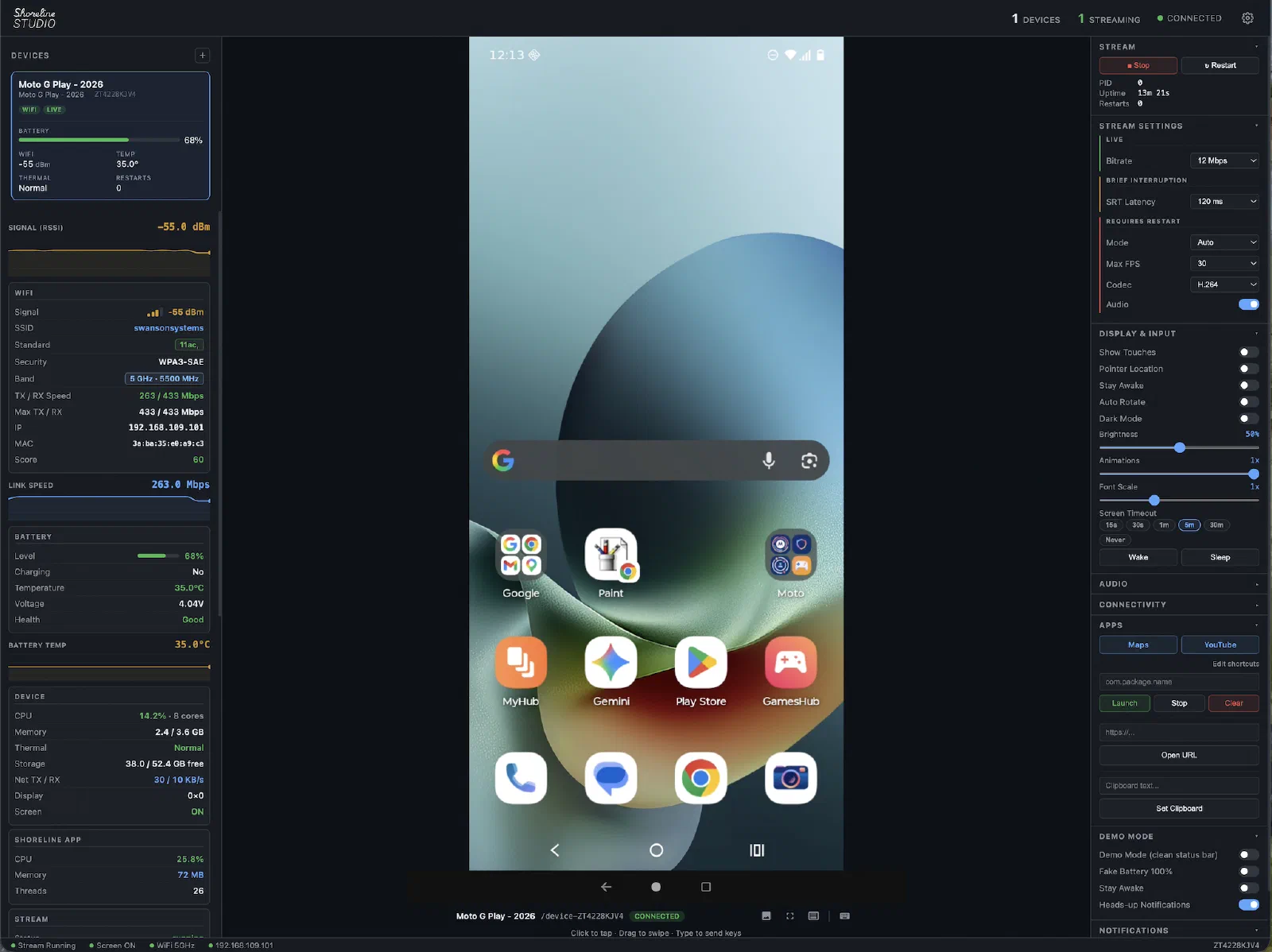
Demo
Media Pipeline
Shoreline Studio
The Android side of the media pipeline is similar to scrcpy. There is a small additional go program that muxes the H.264 video and AAC audio into a MPEG-TS stream and transmits that via SRT. This UDP-based protocol is designed to send media over less-than-ideal networks.
Phone streaming via UDP/WHIP is also supported. pktsrt, the on-device component of shoreline-studio, is built with go-astits, gosrt and pion.
On the supervisor, MediaMTX ingests the SRT feed and provides it in a variety of formats. WHEP is used to monitor the phone via web browser. RTSP/SRT/RTMP can be used for playout.
Available Production Feeds:
- Web Browser: Fullscreen player via WHEP
- Desktop playout app: DeckLink & system video output support
flowchart LR
    subgraph Phone["Android Device"]
        direction TB

        subgraph SERVER["pktsrt-server.jar (Java, app_process)"]
            direction TB
            DM["DisplayManager"] --> VD["VirtualDisplay"]
            VD --> VE["MediaCodec
H.264 HW encoder"]
            AR["AudioRecord"] --> AE["MediaCodec
AAC HW encoder"]
        end

        subgraph AGENT["shoreline-agent (Go)"]
            direction TB
            ASTIT["go-astits
MPEG-TS mux"] --> GOSRT["gosrt
SRT encapsulation"]
        end

        VE --> ASTIT
        AE --> ASTIT
    end

    subgraph Host["Supervisor"]
        GOSRT <-- "SRT (UDP)" --> MTX["MediaMTX"]
        MTX --> WHEP["WHEP / WebRTC"]
        MTX --> RTSP["RTSP"]
        RTSP --> DISP1["display app
(screen mode)"]
        RTSP --> DISP2["display app
(decklink mode)"]
    end

    subgraph Out["Output"]
        WHEP --> BROWSER["Operator dashboard
(Vue / browser)"]
        DISP1 --> SYSOUT["System video output"]
        DISP2 --> CARD["DeckLink Card
(SDI / HDMI)"]
    end
scrcpy
scrcpy sets up an ADB tunnel between the host and device. Audio and video stream through separate sockets encapsulated within the ADB TCP tunnel.
flowchart LR
    subgraph Phone2["Android Device"]
        direction TB

        subgraph SSERVER["scrcpy-server.jar (Java, app_process)"]
            direction TB
            DM2["DisplayManager"] --> VD2["VirtualDisplay"]
            VD2 --> VE2["MediaCodec
H.264 HW encoder"]
            AR2["AudioRecord"] --> AE2["MediaCodec
Opus / AAC encoder"]
        end

        TUNNEL["ADB Tunnel"]
        VE2 --> TUNNEL
        AE2 --> TUNNEL
    end

    subgraph Host2["Host workstation"]
        CLIENT["scrcpy client
FFmpeg decode"] --> SDL["SDL window
(local display)"]
        CLIENT --> AOUT["System audio"]
    end

    TUNNEL <-- "TCP" --> CLIENT
Control Plane
Shoreline Studio maintains an ADB tunnel for device control. This includes running shell commands, pushing assets, and controlling the phone remotely. All ADB communication is handled natively within Shoreline Studio, no external ADB binary is required.
The device agent sends network, stream, and other system stats back to the supervisor via udp. These stats can optionally be forwarded to VictoriaMetrics for logging.
flowchart LR
    subgraph PHONE["Android Device"]
        direction TB
        JAR["pktsrt-server.jar"]
        AGENT["shoreline-agent"]
    end

    HOST["Supervisor"]

    subgraph WRAP[" "]
        direction TB
        UI["Dashboard"]
        subgraph METRICS["Metrics Stack"]
            direction LR
            VM["VictoriaMetrics"]
            GRAF["Grafana"]
        end
        UI ~~~ METRICS
    end

    PHONE <-- "ADB (TCP)
UDP stats" --> HOST
    HOST <-- "Control Socket" --> UI
    HOST -- "Metrics Data" --> METRICS

    style WRAP fill:none,stroke:none,color:#00000000
Remote Management
Controls are delivered over the supervisor’s ADB tunnel. The following controls are currently supported.
Display
- Brightness, font scale
- Screen wake / sleep, screen timeout
- Stay awake, auto-rotate, dark mode
- Show touches & pointer location
Connectivity
- WiFi
- Bluetooth
- Airplane mode & mobile data
Streaming
- Start / stop / restart stream
- Live bitrate and SRT latency adjustment
- Codec & audio
Demo Mode
- Clean status bar
- Fake battery
- Do not disturb
Input
- Touch and long-press
- Keyboard input
- Scroll wheel
Apps
- Configurable app shortcuts
- Open URL
- Set clipboard
Metrics
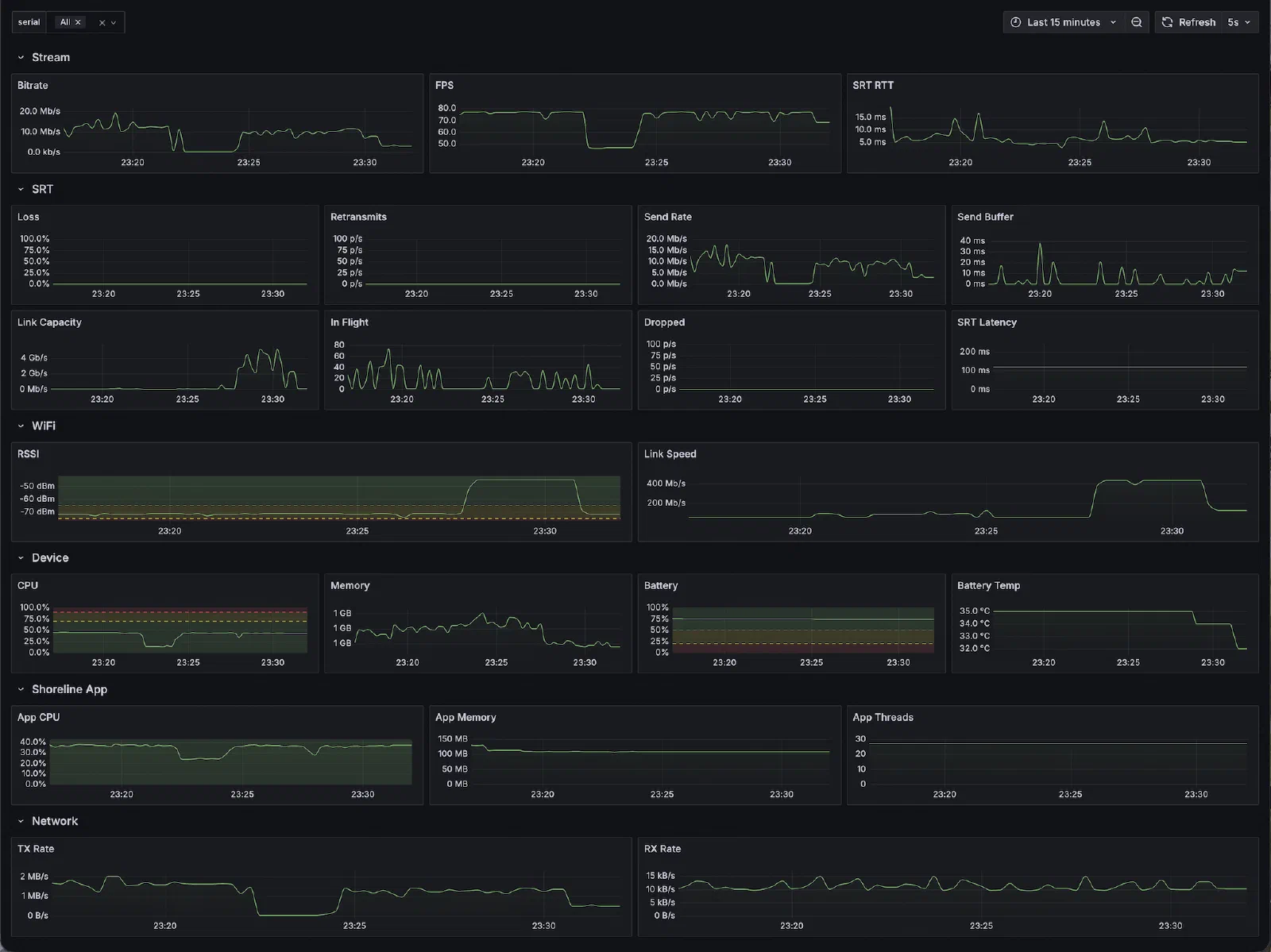
pktsrt streams stats via UDP to the supervisor every 2–10 seconds. If configured, these are forwarded to VictoriaMetrics. Grafana provides a nice dashboard to visualize these metrics. Typically, the stream might just be monitored from the media or networking side. This makes it possible to also monitor the device itself.
- Device health — battery level, WiFi RSSI, CPU usage, memory, thermal, storage, network TX/RX
- Stream health — bitrate, FPS, SRT RTT, packet loss, retransmits, send buffer, flight size, dropped packets
pktsrthealth — process CPU, memory, thread count
Pairing
USB Pairing (WebUSB)
Not many projects support DeckLink cards and WebUSB. Shoreline Studio does! Any device on the network can be used to pair devices with the supervisor. The web app will push the cert from the server and enable ADB over TCP on the Android device via WebUSB. This allows the supervisor to connect and push pktsrt.
sequenceDiagram
    participant Browser
    participant Supervisor
    participant Phone as Android Device

    Browser->>Supervisor: Fetch supervisor certificate
    Supervisor-->>Browser: Certificate
    Browser->>Phone: Push certificate via WebUSB
    Phone-->>Browser: Device trusted
    Browser->>Phone: Enable WiFi ADB (tcpip:5555)
    Phone-->>Browser: IP address
    Browser->>Supervisor: Register device (serial + IP)
    Supervisor->>Phone: ADB tunnel established
    Supervisor-->>Browser: Paired ✓ — stream starts
QR Code Pairing
sequenceDiagram
    participant Browser
    participant Supervisor
    participant Phone as Android Device

    Browser->>Supervisor: Request QR code
    Supervisor-->>Browser: QR (service + password)
    Browser->>Browser: Display QR code
    Phone->>Supervisor: Scan QR → mDNS announce
    Supervisor->>Phone: SPAKE2 key exchange
    Supervisor->>Phone: TLS upgrade + certificate exchange
    Phone-->>Supervisor: Device trusted
    Supervisor->>Phone: ADB tunnel established
    Supervisor-->>Browser: Paired ✓ — stream starts
Multi-Site Deployment
Shoreline Studio can be deployed in a variety of ways. Multiple supervisors and devices provide backup options in difficult RF environments. SRT, WebRTC, and NetBird allow devices to be managed for events with remote contributors.
flowchart LR
    subgraph Venue["Venue"]
        direction TB
        subgraph Primary["Primary"]
            direction TB
            P_UI["Web Management"]
            P_SUP["Supervisor"]
            P_P1["Phone"]
            P_P2["Phone"]
        end

        subgraph Backup["Backup"]
            direction TB
            B_UI["Web Management"]
            B_SUP["Supervisor"]
            B_P1["Phone"]
            B_P2["Phone"]
        end

        METRICS["Metrics Stack"]

        Primary --> METRICS
        Backup --> METRICS
    end

    subgraph Remote["Remote"]
        direction TB
        R_SUP["Supervisor"]
        R_P1["Phone"]
    end

    Venue ~~~ Remote
    Venue <-- "SRT / Control
via NetBird" --> Remote
Where does this sit on the spectrum between complete AI slop and production ready?
Shoreline Studio is built on top of a lot of reliable industry standard tools. The glue is mostly slop at this point but I like the architecture and general direction it is going in.